
Who this is for and what it does
Interpreters taking on-demand phone and video calls who get fewer calls than expected, or see calls disappear or say they were taken.
How calls are offered
Each call is offered to a small number of matching interpreters at the same time, then to more if nobody accepts.
Among the matching interpreters, the call goes first to those who have waited longest for a call. If the caller asked for an interpreter's gender, interpreters of that gender come first.
The first interpreter to select Accept gets the call. Everyone else sees "Call already taken".
If nobody accepts, the call is not offered to you again.
Volume depends on the clients calling in your languages at that time, so some hours and days are quiet even when your setup is right.
Check your setup
You are Online. The call button at the bottom right reads "You're online!". If you pause, you go offline after 15 minutes. If you see "Connection lost", refresh the page.

You are not on a call page. Offers do not show while you are on a call or meeting page. Go to your home page or Appointments while you wait.
Your call types are on your profile. Open your profile (your name at the top left, then My Profile) and check Communication Types includes On-Demand Telephonic and On-Demand Video Interpreting for the calls you take. If one is missing, you are never offered that kind of call. Piedmont Global sets them, so ask your coordination team to add it.
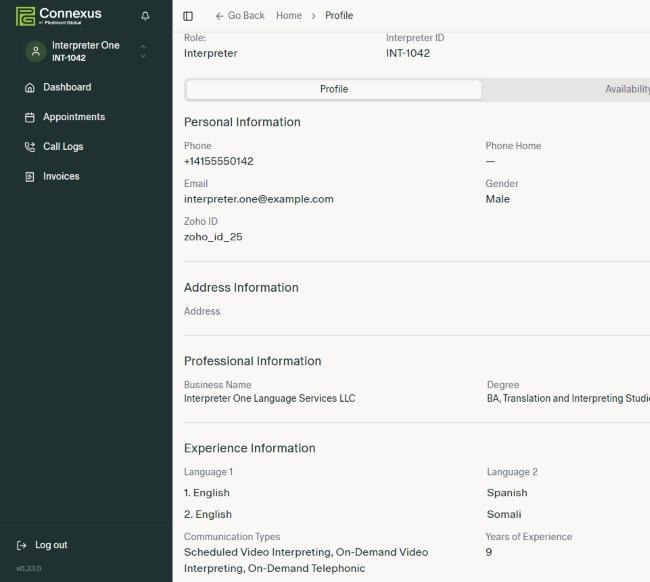
Your languages are right. Each language pair works in one direction, for example Spanish to English. Your languages and the qualifications clients ask for are set by the interpretation team, not by you. See Check your languages and qualifications.
You can hear the ring. See Make sure you hear incoming calls ring.
Some calls also need something only staff can set: a qualification such as medical or legal, a US address when a client requires US-based interpreters, or a gender the caller asked for. A booked appointment starting within 30 minutes, or one in progress that started within the last 2 hours, also stops video calls requested through Connexus reaching you.
What you will see
"Call already taken" with "Another interpreter picked this up. A new call may come in shortly.": another interpreter accepted first.
The call window closed with no message: the caller hung up, or the time to answer ran out.
The call window closed during "Validating call...": the call was for a language pair or call type that is not on your profile.
Missing one call does not set you offline. Missing two within 10 minutes pauses you: see Go online and take on-demand calls. If your setup looks right and you still get no calls for a long time, tell the interpretation team at interpreter@piedmontglobal.com which languages you were online for and when.
Available since March 2026. Updated in Release 11.23.2026.
Last updated 24 November 2026